
Bigger servers don’t fix slow sites

In Short:
- When a busy WordPress site keeps falling over, the instinct, and the hosting upsell, is a bigger server. It rarely fixes anything, because capacity is usually the symptom, not the cause.
- In setups behind reverse proxies and decoupled front-ends, the real culprit is normally a cache being bypassed, or bot traffic that should never reach the origin in the first place.
- The fix is diagnosis before prescription. On one publisher’s site, we took the cache hit rate from near zero to 96 per cent with a configuration change and no extra infrastructure.
A high-traffic site goes down for ten minutes, then comes back on its own. Days later it happens again. No deploy that day, no planned traffic spike, and nothing obvious to point at.
Somewhere in that week an email lands from the hosting provider. Resource usage is high, it says. It might be time to consider the next tier up. More compute, more memory and a bigger plan. It sounds reasonable, and it’s almost always wrong.
A bigger server is the answer when the problem is genuinely capacity. But most of the time, the problem isn’t capacity at all. It’s something making the server do far more work than it should, and a bigger box just gives that something more room to keep misbehaving. You pay more, the symptoms ease for a while, and the actual fault is still sitting there.
This piece is about one of those faults, a cache hit rate of effectively zero on a site that looked, on every capacity metric, perfectly healthy. It’s also about why this particular class of problem shows up most in exactly the setups you’d expect to be the most sophisticated.
What the cache hit rate actually means
A quick definition first.
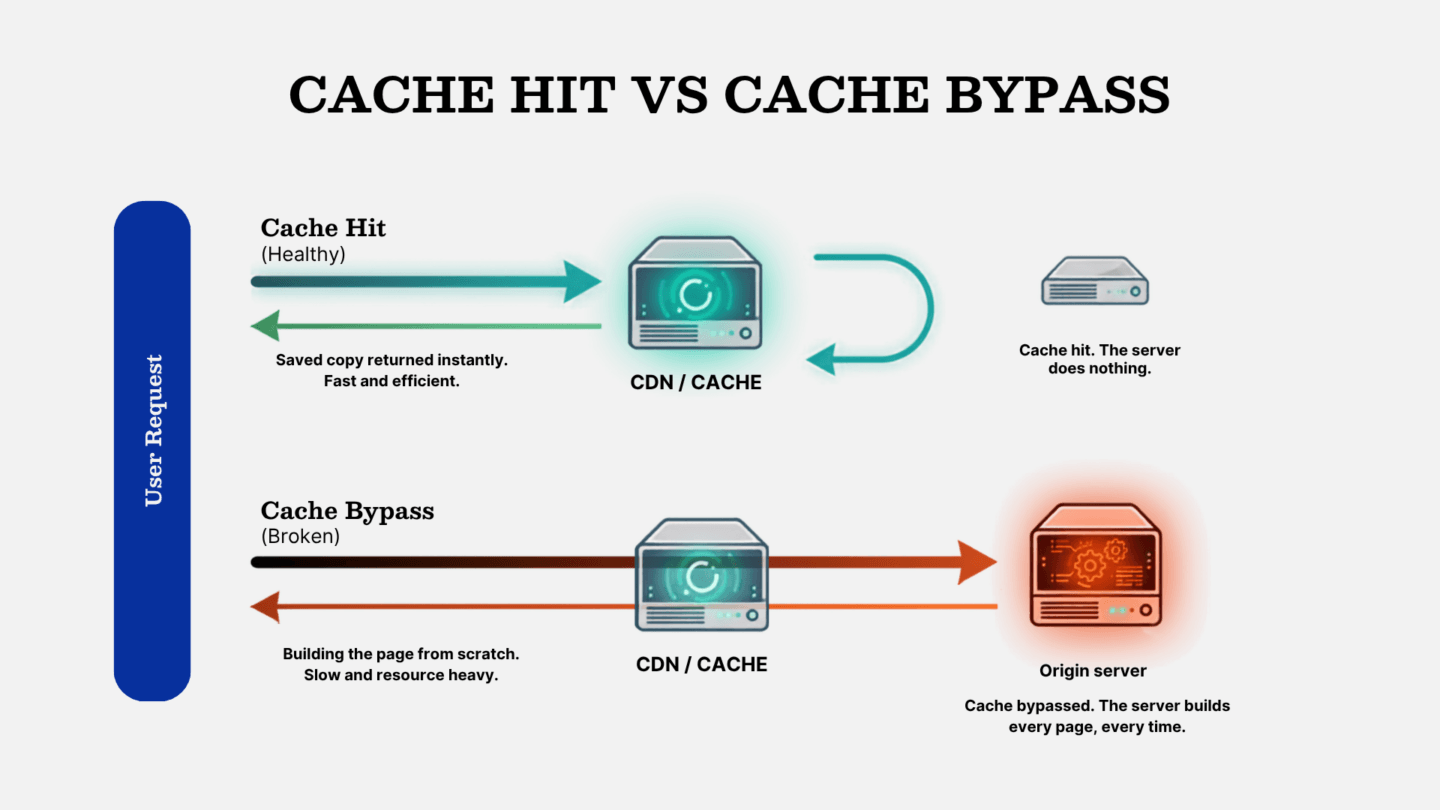
A cache sits in front of your server and keeps copies of pages it has already built, so the next visitor gets the saved copy instead of making the server build it from scratch. The cache hit rate is the share of requests served that way. High is good, because it means most visitors never touch the server. Near-zero means the cache is doing nothing. The server builds every single page from scratch, for every single visitor.
A bigger server is the easy answer, not the right one
When a site struggles, “upgrade the server” is the path of least resistance for everyone involved. It’s easy to recommend, easy to action, and billable, and often enough it appears to work, because throwing capacity at the problem can mask the underlying fault just long enough for everyone to move on.
There’s nothing dishonest about it. A hosting provider sees high resource usage and suggests more resources, which is the data they have and a fair read from where they sit.
But “the server is working hard” and “the server is too small” are different statements: the first is a symptom, the second a diagnosis. Treating one as the other is how organisations end up two or three tiers up the pricing table with the same outages they started with.
We diagnose before we prescribe, because most performance problems we see aren’t capacity problems at all. They’re configuration mismatches, two systems each doing exactly what they were told, just not the same thing as each other.
Sometimes you really do need a bigger server
There’s a real caveat here, because sometimes a bigger server genuinely is the answer. A site that’s grown its real audience threefold in a year may simply have outgrown its plan, and a sustained traffic event, an election night for a news site or a sale day for a retailer, can need headroom that no amount of clever configuration replaces. Undersized database tiers, exhausted PHP workers and memory ceilings that legitimate load keeps hitting are all real problems, and more capacity is a real answer to them.
So the point isn’t “never upgrade”. It’s narrower and more useful than that: you can’t know whether you’re in the capacity case or the configuration case until you’ve looked. The mistake isn’t upgrading, it’s upgrading before you’ve diagnosed, on the assumption that load always means size. Spend the hour in the logs first. Sometimes that confirms you need a bigger plan, and now you’re buying it for a reason. But far more often it tells you the box was never the problem.
What a near-zero cache hit rate actually looks like
The case that prompted this piece is a good example. The client is a high-traffic Australian media organisation running several WordPress properties.
The symptom wasn’t slowness, which is what makes it interesting. The sites were fine almost all of the time, and then, without warning, a whole property would go down for eight to twelve minutes, sometimes twice in a week, throwing 504 Gateway Timeout errors before recovering on its own. The backend would intermittently fail too. Saving something in WordPress admin might time out, then work fine on the second attempt.
On paper, the server looked healthy. CPU, memory and uptime, the numbers a hosting dashboard puts in front of you, were unremarkable, which is exactly how a load problem gets read as a capacity problem: those dashboards show strain, not cause. So we worked through the obvious suspects first, the sequence we run when an enterprise WordPress site starts misbehaving, ruling things out rather than guessing.
What the logs actually showed
We found two unused plugins running slow background jobs on the server. Removing them dropped the outages by about half. We moved background tasks off the front-end trigger and onto a scheduled server-side cron, so live requests stopped competing with them. The sites moved onto the host’s modern network for faster routing and better edge caching. We adjusted the cache headers so older content stayed cached for longer.
Every step helped and the outages kept dropping, but the cache hit rate stayed stubbornly near zero. That’s the number the capacity dashboards never show you, and the one most teams don’t alert on, which is how a cache can sit at zero without tripping any of the usual alarms. It doesn’t lie, though, and it was pointing at something none of the individual fixes had touched, so we read the logs thoroughly.
How a single query parameter disabled the cache
The pattern, once we saw it, was the same request shape repeated thousands of times. The client’s main website ran on Next.js, a decoupled front-end sitting in front of the WordPress properties, and every link from that front-end to a WordPress page carried a unique query parameter, added automatically.
That parameter is the whole problem. The caching layer skips any URL carrying a query parameter by default, treating it as dynamic content and going back to the origin for a fresh copy, which is standard behaviour rather than a bug: Cloudflare’s caching for WordPress bypasses the cache for URLs with query parameters, on the reasonable assumption that a query string usually signals something dynamic. A unique parameter on every link meant every request looked unique to the cache, so every request bypassed it and landed on the origin directly.
The server wasn’t struggling because it was too small. It was struggling because every single request was reaching it, when almost none of them should have.
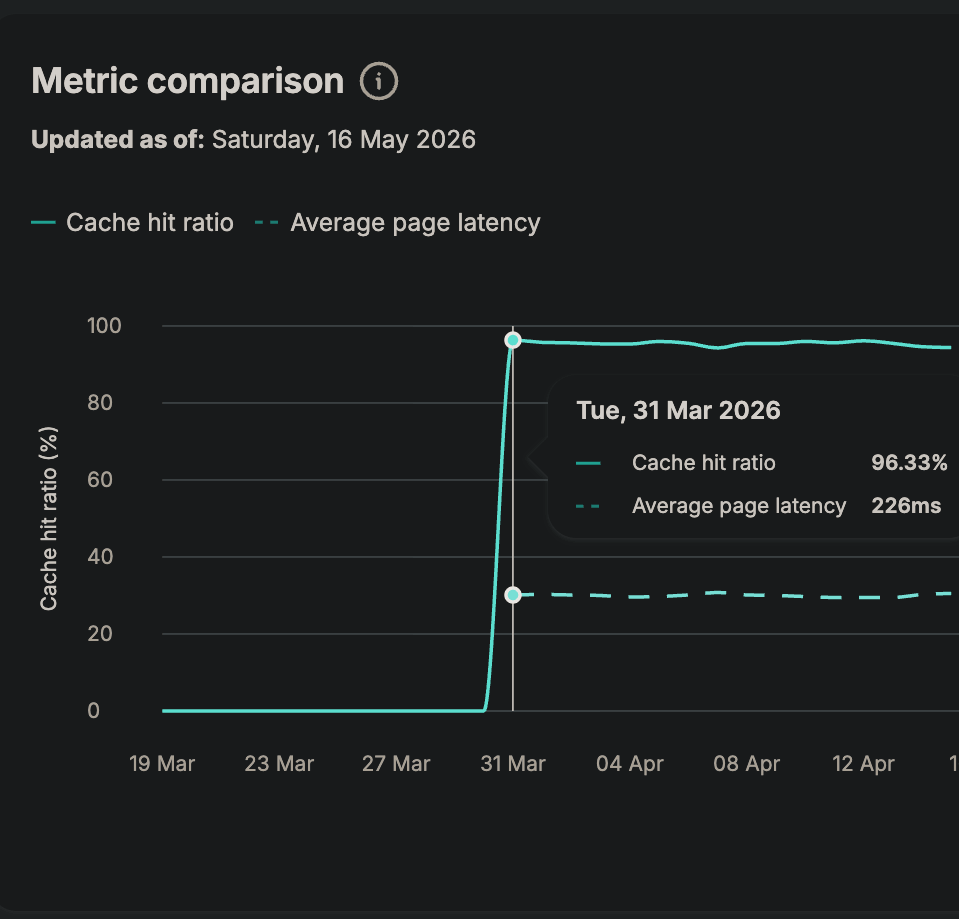
The fix was small. We showed the client where the parameter was being added, they stripped it, and the change took effect immediately: the cache hit rate went from effectively zero to around 96 per cent, average page generation settled near 226 milliseconds, and there have been no timeouts since.
It’s worth being straight about that zero-to-96 figure, because it sounds too good to be true. It isn’t a story about heroic optimisation. A single rule had switched off the cache, and nobody had connected it to the outages. Once we found that rule and switched it back on, the platform did what it had always been capable of. It just never had the chance before.
A bigger server would have done nothing here, except cost more and possibly delay the day someone read the logs.
Enterprise WordPress is rarely just WordPress
This is less a one-off than a structural feature of how serious WordPress sites are built. A real deployment is almost never a single server answering requests; it sits behind layers, a CDN, a reverse proxy, often a decoupled front-end like Next.js, sometimes several properties sharing infrastructure. Each layer is there for a good reason, and each one is configured sensibly on its own.
The trouble lives in the interaction.
Caches don’t store pages against the plain address you see in the browser. They build a “cache key”, and the URL, query string included, is part of it. Every major CDN treats query strings as significant to caching by default, whether that means bypassing the cache for those URLs or storing a separate copy per unique string. Cloudflare, Microsoft Azure, AWS CloudFront and Google Cloud CDN all work this way.
So the moment one layer starts decorating URLs with unique parameters, and another layer treats unique parameters as a reason not to cache, you’ve built a machine that bypasses its own cache on every request. Both layers are behaving correctly. The system is broken.
That’s why this class of fault barely appears on a standard single-server WordPress site and turns up precisely in the sophisticated, multi-layer setups. More moving parts, each sane on its own, means more seams for a mismatch to hide in, and the cache hit rate is the one metric that exposes it. It’s the first thing we look at when a well-resourced site keeps falling over.
When it’s not the cache, it’s traffic that shouldn’t be there
Caching is one of the two big reasons a healthy-looking server gets overwhelmed. The other is traffic that should never have reached it.
It’s worth a moment on how much this has changed. Automated traffic has overtaken human traffic on the web, with bots making up around 53 per cent of all requests in 2025, up from 51 per cent the year before, according to the Imperva and Thales Bad Bot Report, and Cloudflare’s own network data points the same way. More than half of what hits your site probably isn’t a person.
The common assumption is that when a site buckles under traffic, the AI crawlers did it. Usually they didn’t.
The well-known AI crawlers, like the established search bots, mostly behave themselves. They crawl at rates not far off a normal SEO bot.
Where the real load comes from
The damage tends to come from a rougher crowd: brute-force scrapers built to copy an entire site as fast as they can, and login attacks hammering wp-login.php and xmlrpc.php with thousands of attempts. That’s the traffic generating the load, and it has no business being there at all.
There’s a newer wrinkle sitting on top, and it’s a business question more than a technical one. As human traffic falls and bot traffic climbs, every publisher has to decide which automated visitors to allow, because some AI crawlers feed search tools that send readers back while others scrape content to train models and send nothing in return. Cloudflare’s AI Crawl Control gives you a per-crawler view of who’s visiting, how often, and whether they respect your robots.txt, and lets you allow or block each one.
There’s a trap here worth knowing if discovery matters to you. A blanket ‘block all AI bots’ rule runs at the firewall, which sits in front of robots.txt, so it can quietly remove you from the AI answer engines that are becoming a real source of referral traffic. Block the scrapers you don’t want, by all means, but don’t accidentally block the ones starting to send you readers. That’s a strategy decision, and it shouldn’t be made by a default toggle.
Diagnose before you prescribe
The cache story and the bot story are different faults with the same moral. The visible symptom rarely names the cause. So the method matters more than any single fix, and it starts with visibility. We push clients onto Cloudflare largely because it gives a clear view of every request arriving from the internet, which is where most of these answers live. From there, it’s a sequence of questions rather than a checklist of actions. Is the traffic legitimate or not? If it’s legitimate, is the load coming from the cache being bypassed, or from the origin doing work it shouldn’t? If it’s not legitimate, is it scraping, or an auth attack?
One discipline catches people out: don’t only look at the last 24 hours. Bots and attacks come and go on their own schedules, so we check across three, seven and thirty-day windows before drawing conclusions, because a pattern that’s invisible today was hammering the site last Tuesday.
Then you change one thing and measure, rather than five at once. Changing five teaches you nothing about which one mattered.
We’ve turned this into a standardised diagnostic process. Any engineer on our team works the same problem the same way. The full version, the decision tree, the remediation playbooks and the monitoring protocol, is more than fits here, and we’re packaging it up as a separate guide.
The fix is where the next outage comes from
Remediation has its own failure mode, and it’s a nasty one. Block traffic too broadly and you take out the traffic you needed: a firewall rule aimed at a scraper can catch Googlebot, a geo-block can wall off real readers. You solve the outage and quietly start a slower, worse problem, your search rankings sliding because the crawler you accidentally blocked has stopped being able to index you.
Don’t call a change done when the site comes back up. Call it done when you’ve confirmed you didn’t break something else.
In practice, that means checking Core Web Vitals straight after a rule change to confirm legitimate visitors and crawlers still get through, then watching Google Search Console over the following week or two for crawl errors or coverage drops. It also means preferring a targeted challenge, the kind a real browser passes, and a bot fails, over a hard block wherever you can, because the cost of a false positive is so much higher than the cost of being slightly less aggressive.
The goal was never to block the most traffic. It was to remove the traffic causing harm while protecting every visit that matters.
Before you upgrade, get a second look
The publisher in this story didn’t have a server problem. They had a single configuration rule, sitting quietly between two systems that were each working exactly as designed, switching off a cache that was perfectly capable of doing its job. No amount of extra compute would have found it; reading the logs found it in an afternoon.
That pattern is why the reflex is worth resisting. When a well-built site keeps falling over, the expensive mistake isn’t the bug. It’s reaching for the invoice before reading the logs.
Bigger servers don’t fix broken caches. They don’t fix bad bot traffic either. They just make the wrong answer more expensive.
If your WordPress site is timing out, slowing down, or struggling under load, the answer your hosting provider is reaching for might not be the right one. Start with the root cause. That’s a diagnosis, not a purchase.